Control your computer
with your hand.
Point at your webcam to move the cursor. Pinch to click and drag, make a V to scroll, swipe to change desktops. Everything else is yours to set: any gesture, any shortcut.
curl -fsSL https://airpane.anchit-tandon.com/desktop/install.sh | bashFree. Takes a minute or two. Needs macOS with Python 3.9 to 3.12 (the installer tells you if it is missing). Video never leaves your Mac.
Install
Paste the command above in Terminal. After that, start Airpane from the Applications folder in your home folder.
Allow two things
Camera (macOS asks) and Accessibility for Terminal in System Settings > Privacy & Security, so your hand can move the mouse.
Point
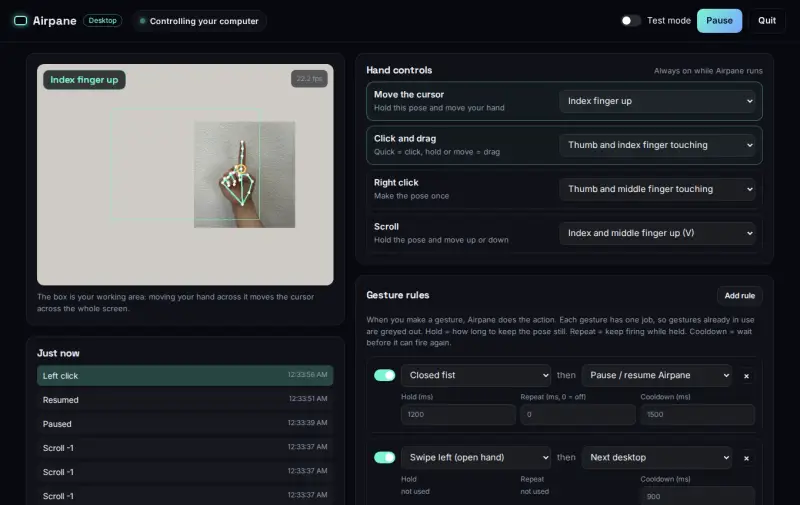
Sit about an arm's length away, raise your index finger and move. The settings page shows what the camera sees.
16 gestures out of the box
| Index finger up, move | Move the cursor |
|---|---|
| Thumb touches index, quickly | Click |
| Thumb touches index, move | Drag |
| Thumb touches middle finger | Right click |
| V sign, move up or down | Scroll |
| Open hand, swipe left or right | Next or previous desktop |
| Open hand, swipe up or down | Mission Control or show desktop |
| Three fingers, hold | Switch app |
| Thumbs up, hold | Volume up |
| Thumbs down, hold | Volume down |
| Index and pinky up, hold | Play or pause |
| Only the pinky up, hold | Mute |
| Four fingers, thumb folded in | Screenshot |
| Fist, hold a second | Pause or resume Airpane |
Your rules
Every gesture above can be changed, and you can add your own on the settings page:
- One gesture, one job: 12 hand poses and 4 swipes, each doing exactly one thing, so nothing fires by accident
- Any action: clicks, scrolling, any keyboard shortcut, typing text, volume and music keys, Mission Control, desktops, screenshots, Spotlight
- Timing: how long to hold, repeat while held, cooldown between uses
- Feel: hand travel, steadiness, click speed, scroll speed and direction
- Test mode: see what each gesture would do without touching your computer
Safe by design
- Hold a fist or press Ctrl + Alt + P to pause at any moment
- The mouse button is released if your hand leaves the camera mid-drag
- Runs entirely on your Mac; the settings page is only reachable from it
- Never runs commands, only clicks and keys you choose
Also from Airpane
Show a website floating in the air with a phone and a clear sheet, controlled by the same hand gestures.